Botz: Internal Bot Library for Openfire

VERSION 3 Published

Created on: Sep 17, 2007 10:40 AM by aznidin - Last Modified:  Sep 21, 2007 12:06 PM by aznidin

Overview

A common way of creating a new XMPP service is to develop a plugin that will serve the service as a sub domain. That said, if Openfire's domain is example.com programmers would develop the new service as an internal or external component and deploy it as myservice.example.com.

Botz library adds the already rich and extensible Openfire with the ability to create internal user bots. With Botz library, programmers may choose to develop a user bot to run as a service bearing myservice@example.com as its JID. To Openfire, the user bot is just like other (human) users.

Botz library is strictly internal for Openfire. The notion of a user connection doesn't involve any TCP/IP or socket; hence virtual. There isn't even a C2S implementation.

Botz Classes

Botz library contains BotzConnection class that allows a user bot to login as a registered or anonymous user. The class optionally automates the creation and registration of the user bot if it has not existed in the database. To make the user bot useful, programmers would implement BotzPacketReceiver interface to respond to received packets. BotzPacketReceiver.processIncomingPacket(Packet) will be called for every packet received by the user bot. To send packets to other XMPP entities, programmers in turn call BotzConnection.sendPacket(Packet).

Botz classes may be used in situations where an internal user bot is needed. Botz most likely proves itself useful in the development of Openfire extensions through plugins.

Key Features

  • Login anonymously
  • Login as an existing Openfire user
  • Optionally create a new user as a registered user (bot) if it does not exist. The newly created user account will be stored in the database. Because user creation is done using SQL statements internal to Openfire, this should work for all Openfire-supported databases.
  • The above features hide programmers from handling the connection establishment and allow programmers to focus on packet exchanges.
  • Change BotPacketReceiver on the fly, thus switch behaviors and create multiple personalities of a bot.

Using Botz in A Plugin

The following is the code snippet that shows a way to use Botz classes in a plugin. The sample plugin is a parrot bot service that simply echoes <message/> packets back to the sender.

import org.jivesoftware.openfire.botz.BotzConnection;
import org.jivesoftware.openfire.botz.BotzPacketReceiver;
 
public class ParrotBot implements Plugin {
    @Override
    public void destroyPlugin() { }
 
    @Override
    public void initializePlugin(PluginManager manager, File pluginDirectory) {
        BotzPacketReceiver packetReceiver = new BotzPacketReceiver() {
            BotzConnection bot;
 
            public void initialize(BotzConnection bot) {
                this.bot = bot;
            }
 
            public void processIncoming(Packet packet) {
                if (packet instanceof Message) {
                    // Echo back to sender
                    packet.setTo(packet.getFrom());
                    bot.sendPacket(packet);
                }
            }
 
            public void processIncomingRaw(String rawText) { };
            public void terminate() { };
        };
 
        BotzConnection bot = new BotzConnection(packetReceiver);
        try {
            // Create user and login
            bot.login("parrot");
            Presence presence = new Presence();
            presence.setStatus("Online");
            bot.sendPacket(presence);
        } catch (Exception e) {
            e.printStackTrace();
        }
    }
}

License

This software is published under the terms of the GNU General Public License (GPL).

Downloads

Botz Library

Openfire Version Botz Library Source Code Version License
3.4.* botz-openfire-3.4.jar botz-openfire-3-4.src.zip 1.0.0 GPL
3.3.2-3.3.* botz-openfire-3-3.jar botz-openfire-3-3.src.zip 1.0.0 GPL


Sample Bot Plugin

Plugin Name Openfire Version Plugin JAR Source Code Version License
ParrotBot 3.4.* parrotbot-openfire-3-4.jar parrotbot-openfire-3-4.src.zip 1.0.0 GPL
ParrotBot 3.3.2-3.3.* parrotbot-openfire-3-3.jar parrotbot-openfire-3-3.src.zip 1.0.0 GPL


Installation

The Botz library is not a plugin in itself, and does not contain any plugin-related class. It is meant for use in an application development. To use the library in an Openfire plugin development, copy botz-openfire-version.jar file into the lib directory of the plugin directory structure. If there are more than one plugins that will use Botz library, the JAR file can be copied to a global class path like openfire/build/lib/dist or {$OPENFIRE_HOME}/lib.

To install the sample ParrotBot plugin, rename parrotbot-openfire-version.jar to parrotbot.jar and copy it into {$OPENFIRE_HOME}/plugins directory. To see the ParrotBot in action, send messages to it using your favorite Jabber client.

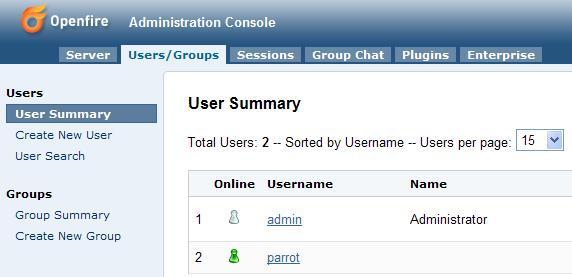
The parrot user bot appears as a real user in Openfire admin console:
userbot.jpg
Figure 1: Parrot Bot As A Registered User


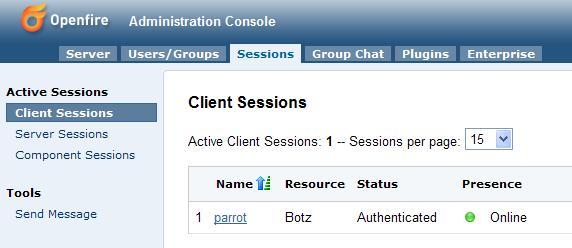
When logged in, the bot has a client session:
botsession.jpg
Figure 2: Parrot Bot Logged In

User-Contributed Bot Plugins

Plugin Name Plugin JAR Source Code Version Author License


Bot Plugins Wish List

Plugin Name Description
CAPService An implementation of XEP-0127:Common Alerting Protocol(CAP) Over XMPP
NameService MUC Name Service
RoomService MUC Room Service


Tags: bot, botz, plugin
Average User Rating
(5 ratings)


Dec 28, 2007 12:46 AM Click to view sosys's profile sosys says:

Hi ALl,
I have this errors. Could Somebody please assist me? I have put the parrotbot.jar in the plugins and also the botz-openfire-3-3.jar in the build/lib. Im using openfire 3.3. Please help, thanks

Error loading plugin: E:\Project\EMO\Server\openfire\netbeansProject\plugins\parrotbot
java.lang.NoSuchMethodError: org.jivesoftware.openfire.user.UserManager.createUser(Ljava/lang/String;Ljava/lang/String;Ljava/lang/String;Ljava/lang/String;)Lorg/jivesoftware/openfire/user/User;
at org.jivesoftware.openfire.botz.BotzConnection.login(BotzConnection.java:318)
at org.jivesoftware.openfire.botz.BotzConnection.login(BotzConnection.java:241)
at org.jivesoftware.openfire.plugin.ParrotBot.initializePlugin(ParrotBot.java:75)
at org.jivesoftware.openfire.container.PluginManager.loadPlugin(PluginManager.java:404)
at org.jivesoftware.openfire.container.PluginManager.access$200(PluginManager.java:46)
at org.jivesoftware.openfire.container.PluginManager$PluginMonitor.run(PluginManager.java:916)
at java.util.concurrent.Executors$RunnableAdapter.call(Executors.java:441)
at java.util.concurrent.FutureTask$Sync.innerRunAndReset(FutureTask.java:317)
at java.util.concurrent.FutureTask.runAndReset(FutureTask.java:150)
at java.util.concurrent.ScheduledThreadPoolExecutor$ScheduledFutureTask.access$101(ScheduledThreadPoolExecutor.java:98)
at java.util.concurrent.ScheduledThreadPoolExecutor$ScheduledFutureTask.runPeriodic(ScheduledThreadPoolExecutor.java:181)
at java.util.concurrent.ScheduledThreadPoolExecutor$ScheduledFutureTask.run(ScheduledThreadPoolExecutor.java:205)
at java.util.concurrent.ThreadPoolExecutor$Worker.runTask(ThreadPoolExecutor.java:885)
at java.util.concurrent.ThreadPoolExecutor$Worker.run(ThreadPoolExecutor.java:907)
at java.lang.Thread.run(Thread.java:619)

Dec 28, 2007 1:19 AM Click to view sosys's profile sosys says:

Hi, how to chat with parrotBot ? What is the password for parrotBot? I tried to change the password, and seems i can log in but cant add user.

Dec 28, 2007 1:40 AM Click to view sosys's profile sosys says:

again.. i cant see the parrotBot in the 'Session'. the parrotbot appear only as normal user, and not online.

Feb 29, 2008 6:22 PM Click to view adev's profile adev says: in response to: sosys

sosys, your path might be the issue.. why did you place it in openfire\netbeansProject? i'm assuming you're using a source build. if that's the case, parrotbot-openfire-3-3.jar should be in openfire/target/openfire/plugins/
also, if you're only testing the parrotbot, you don't need to have a copy of the botz library in lib/ since it already has the jar file in its local lib/ path
in regards to your second post, the parrotbot does not need a password since it authenticates itself, and the account is automatically created if it already doesn't exist. once you have this figured out, send a message to parrot@<YOUR_HOSTNAME>/Botz

as for my question, i'd like to know if it would be possible to authenticate the bot without having to create an account since the authentication on my server takes place on ldap, which is read-only. if not, how can i assign a name of my own choice to the bot using the anonymous login? the bot gets a random name when using anonymous login.

Mar 4, 2008 1:57 PM Click to view adev's profile adev says: in response to: adev

i solved my problem on my own.
as a reference for anyone else that's interested..
in order to set a username with anonymous login, you must first comment out lines 345 to 359 (for the source version of 3.4), this is where it checks if the user is registered or not.
you should then be able to login using bot.login("bot_name", "resource");

thank you for this library.

Mar 4, 2008 2:08 PM Click to view adev's profile adev says: in response to: adev

i apologize, i forgot to mention the above changes need to be made to BotzConnection.java

Apr 23, 2008 11:27 AM Click to view thebugslayer's profile thebugslayer says:

I tried with openfire 3.5 and got this to work after few fixes. I thought I might give you feedback and let you updates your dist.

1)The ParrotBot.java is not compilable because you have @Override on methods that's from interface. So you remove it will compile.

2)The document from http://www.igniterealtime.org/builds/openfire/docs/latest/documentation/plugin-dev-guide.html didn't tell where to get the build script! So I can't compile your parrot plugin sample.

After looking arround, I downloaded the openfire source distribution, copied your parrot plugin into src/plugins directory, and cd into root src project and ran:

$ ant -f build/build.xml openfire plugin -Dplugin=parrotbot

Now I got a generated plugin jar under arget/openfire/plugins

Now I can update and play with codes to get further playing with botz library. Great work Aznidin Zainuddin!

May 25, 2008 4:10 PM Click to view tahabekir's profile tahabekir says:

Hi,
I'm using the botz library. I perform a login with a username which already exists in the registered users. An msn transport is registered for the user.
Sometime (2-3 minutes) after I create the connection and perform the login, the user becomes offline automatically.

How can I solve the problem?

Thanks

Jun 2, 2008 7:39 PM Click to view hemon's profile hemon says: in response to: tahabekir

maybe this link will help you:
http://www.igniterealtime.org/community/message/172021#172021